Case Study · Lanhu to Unity Integration

How a small Unity team can move from Lanhu design files into a first prefab validation loop

This is not another generic marketing page. It combines the current released path, public setup screenshots, and already-public feedback so the first integration case can be judged from real public evidence instead of slogans.

Evidence boundary: this page only uses the current public Lanhu-to-Unity released status, public docs screenshots, homepage compare flow, and already-public feedback. It does not invent private customer data.

Proof Summary

  • The current public evidence is already strong enough to support a first Lanhu-to-Unity integration validation path without relying only on homepage copy.
  • One public quote from a two-person Unity studio says one screen moved from a day and a half into a direct logic-binding stage, but that line remains a quoted public testimonial rather than a universal benchmark.
  • A released path is best validated on one representative module first and only then widened into a larger workflow change.
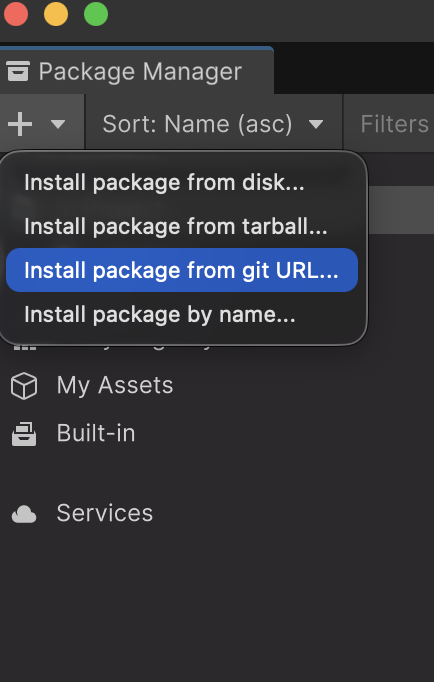
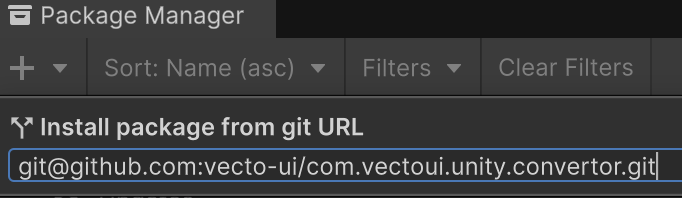
Public screenshot of VectoUI Unity plugin installation via Git URL
Public docs screenshot: install the VectoUI Unity Converter package from Git URL.

Case Definition

Team profile

Two-person Unity indie studio

This comes from a public homepage testimonial, not from extra unpublished customer detail.

Target path

Lanhu to Unity

Roadmap currently marks this path as released, which makes it the safest public case-study anchor.

Validation style

One real module first

The integration guide and prerequisites page both support a contained first validation instead of a full migration.

Before VectoUI

  • Designers export slices and reference screenshots manually, then package them for the Unity engineer.
  • The engineer recreates nodes by hand, checks anchors, font sizes, and hierarchy one by one.
  • When designs change, the team falls back into the same manual rebuild and review loop.

With VectoUI

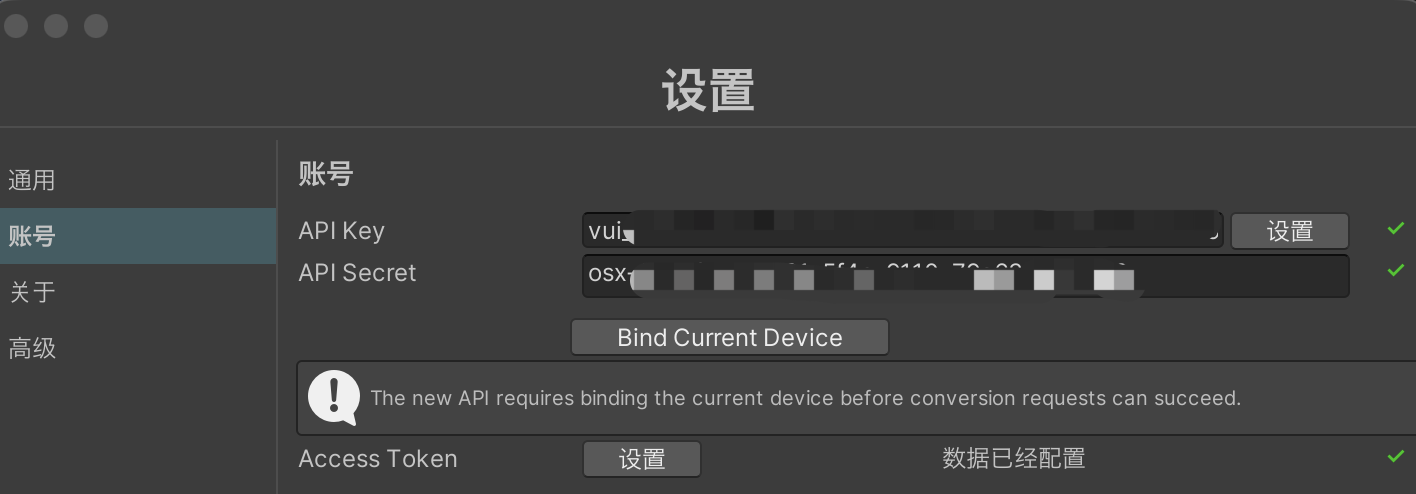
  • The engineer follows the public docs path for install, disclaimer review, API key binding, and design-source credentials.
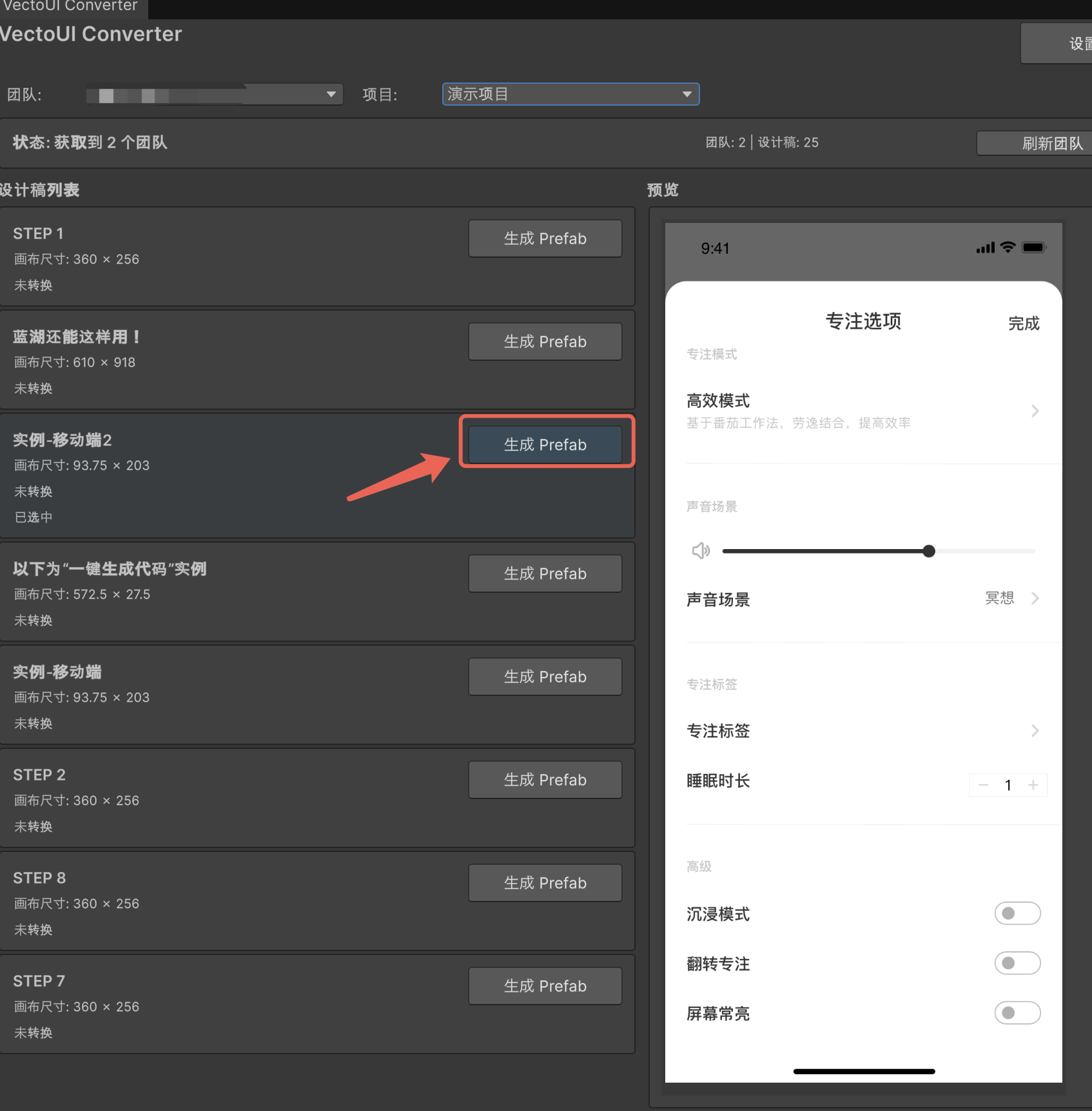
  • The team validates one real screen through the Generate Prefab flow, focusing first on assets, hierarchy restoration, and output shape.
  • After the first module is proven, the engineer moves directly into logic binding instead of spending the same time on manual UI reconstruction.

What this page can prove clearly

Public time-savings quote

One screen moved from a day and a half into direct logic binding

This is quoted from a public testimonial and should stay framed as one team’s published feedback, not as a universal benchmark.

Setup visibility

Install, bind, and generate already have public screenshots

The first integration path is not hidden behind abstract claims; the current docs already expose the key steps visually.

Pilot rhythm

Validate in a narrow scope first

That rhythm fits both the released-path boundary and the practical risk profile of a small team.

What still remains manual

  • Interaction logic still needs to be bound by engineers and is not silently replaced by prefab generation.
  • The design-source token, API key, and legal platform access still have to be provided by the user.
  • Project-specific post-processing, custom component rules, and unusual conventions remain explicit engineering work.

Public screenshot evidence

Public screenshot of the VectoUI data-access disclaimer
Public docs screenshot: the first-open data-access disclaimer keeps the product boundary explicit.
Public screenshot of API key binding in the VectoUI Unity plugin
Public docs screenshot: bind the API key first, then continue into design-source credentials.
Public screenshot of the VectoUI Unity generation interface
Public docs screenshot: once setup is complete, the workflow moves from manual rebuild into generated-output validation.

Public feedback quote

We used to spend a day and a half connecting one screen. With VectoUI generating it for us, we go straight to logic binding — efficiency up by more than 3x.
Chen Wei
Unity Client Developer
Two-person Unity Indie Studio

Evidence Sources

Open integration guide

The main public source for setup steps and screenshots.

Open integration guide

Open prerequisites

The public page for access, credentials, and setup prerequisites.

Open prerequisites

Open roadmap

Use roadmap as the source of truth for the released status of Lanhu to Unity.

Open roadmap

Open public testimonials

The original public homepage location for the quoted feedback used here.

Open public testimonials

Next Steps

Manual UI before-and-after proof

If you want process evidence rather than one integration case, continue into the before-and-after proof page.

Manual UI before-and-after proof

Unity UI delivery workflow

Move into the broader workflow once the question becomes rollout order instead of setup proof.

Unity UI delivery workflow

FAQ

Keep invite-only access, interaction logic, font mapping, and boundary questions in FAQ.

FAQ

FAQ

Common questions

Why does this page avoid a brand-name customer headline?

Because the public evidence currently includes role, team profile, docs screenshots, and homepage quotes, but not a fully published brand-authorized customer interview.

Does this prove the same outcome for every Unity project?

No. It proves that the released path already has real public setup and usage evidence. It does not guarantee the same time result for every project.

What should a team do if input quality is still unstable?

Go back to guidelines, prerequisites, and FAQ first. The cleanest case study still does not replace weak source quality or missing access preparation.